Wix Shopping Limitations

- Oct 17, 2026 modified: Oct, 17 2026
Wix Shopping Limitations
Wix is one of the easiest ways to get a website online, and its Wix Stores add-on lets you start selling within an afternoon. But ease of setup is not the same as a good long-term home for a shopping site. As Gold Coast SEO specialists with 25+ years of web development behind us, we look at where Wix holds an online store back - starting with something most owners never notice: what happens to your product image names.
Is Wix Bad for SEO?
Not for basic sites. Google's John Mueller publicly stated back in 2021 that Wix is fine for SEO, and Wix has improved a lot since then. It compresses images automatically, serves modern formats like WebP and AVIF, and generates XML sitemaps that include product images.
The problem is not that Wix is broken. The problem is the ceiling. On Wix you rent the platform, and several things that matter for an online store - your image URLs, your checkout and your ability to move - are simply not yours to control.
The Limitations of Wix for a Shopping Site
1. Your Image File Names Are Thrown Away
Standard image SEO advice is to give each image a descriptive file name, such as Horizontal-Wall-Rack-Clear-Acrylic.jpg. On Wix the file is stored and served under a random media ID instead. The original name is only tacked onto the end of the resized image URL, URL-encoded, and you can't edit it.
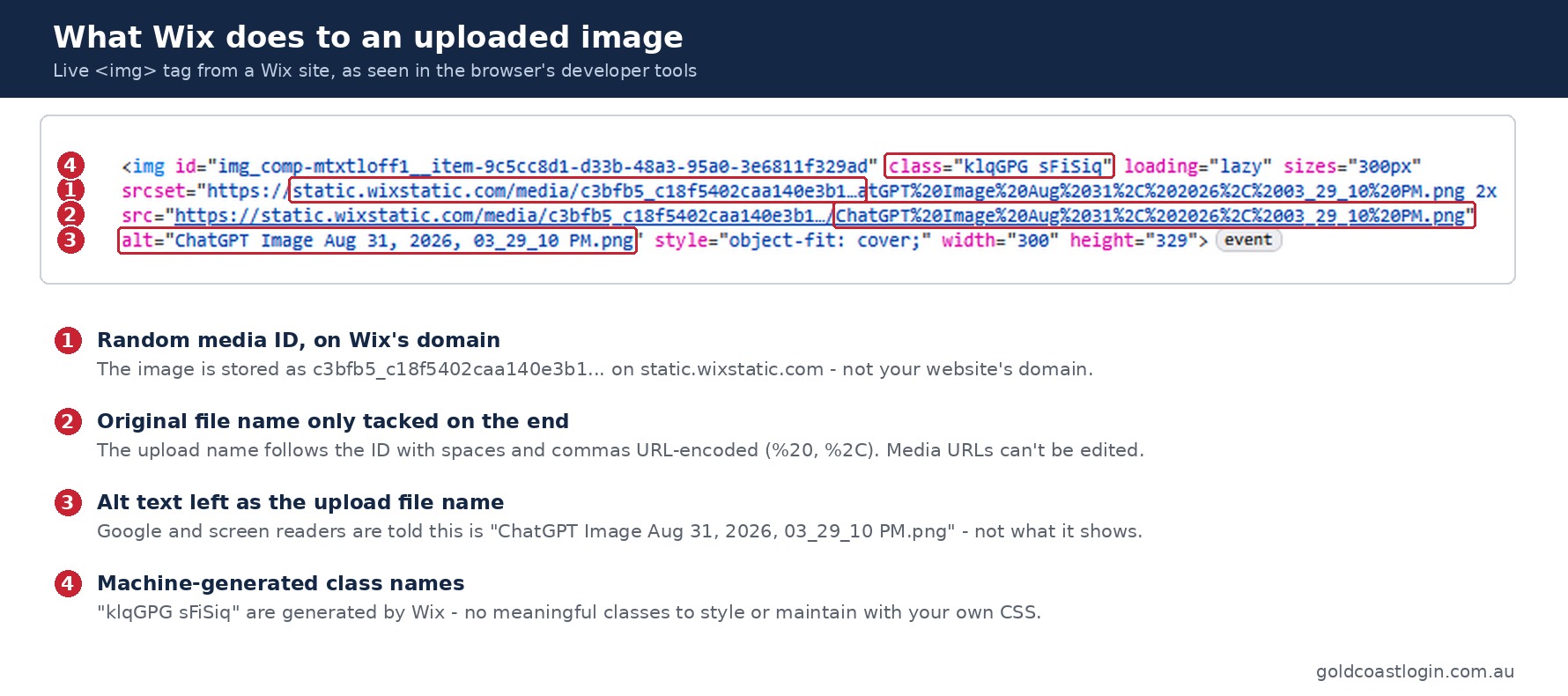
The name of your file does not appear in the URL.
https://support.wix.com/en/article/wix-media-request-editing-the-url-of-a-media-file
Here is what that looks like in practice:
What you uploaded:
Horizontal-Wall-Rack-Clear-Acrylic.jpg

What Wix serves:
https://static.wixstatic.com/media/e50527_fa26dd116fdf4bf08a5d8fac30f9dc14~mv2.jpg
Wix also does not allow media URLs to be edited. Being able to change them is an open feature request in Wix's help centre, marked as “collecting votes” - meaning it isn't planned.
For a store with hundreds of product photos, that is hundreds of missed signals. Your only remaining levers for image SEO are alt text, captions and the copy around the image.
Wix Contradicts Itself
Wix's own marketing blog tells users to rename image files with descriptive, keyword-rich names because search engines crawl file names. Its support documentation confirms the file name never makes it into the image URL. If you've followed that blog advice on a Wix store, the renamed files only help you find images in the Media Manager - not in Google.
2. Your Images Live on Wix's Domain, Not Yours
Every image on a Wix site is served from static.wixstatic.com. Wix confirms it is not possible to replace that part of the URL with your own domain name. When your product photos appear in Google Images, the image URL credits a Wix server rather than your business domain.
Compare that to our custom online shopping cart, where product images are uploaded to your own domain and automatically named from the product details to add SEO value.
3. The Checkout Is Locked
The checkout is where a sale is won or lost, yet on Wix its design, layout and styling are off limits. This applies across Wix Stores, Bookings, Restaurants and other Wix checkouts. If you need full control over the checkout flow, you have to leave the standard Wix Stores system altogether.
4. Hard Caps on Product Options
Wix Stores sets platform limits that no plan upgrade removes:
- Maximum of 6 product options per product (e.g. colour, size, material)
- Maximum of 100 choices per option
- Maximum of 1,000 variants per product
- Maximum of 50,000 products per store
For a small gift shop these are generous. For clothing, auto parts or made-to-measure products with many size, colour and finish combinations, the variant cap can arrive faster than you'd expect.
5. Basic Multi-Currency Pricing
Multi-currency checkout on Wix uses automatic daily XE exchange rates, with no per-currency price lists. If you want to sell a product at a set $49 AUD and a rounded $35 USD, you can't - overseas customers see whatever the day's conversion produces.
6. Less Control Over Technical SEO
Wix's URL structure, page speed and technical SEO options are less flexible than self-hosted platforms. Wix's built-in SEO tools cover the basics well, but once an SEO strategy moves beyond the checklist - custom URL structures, fine-grained Core Web Vitals tuning, or large numbers of landing pages - you start working around the platform rather than with it.
7. Moving Away Is Hard
You can export your product list, but you can't take your Wix site design or code with you. Migrating away is not straightforward, and every image URL on static.wixstatic.com disappears when the account closes - along with any Google Images rankings they had earned.
The cost of a platform isn't just the monthly fee. It's also the cost of leaving. A migration means rebuilding pages, re-uploading images and setting up 301 redirects - our Website Migration Guide explains why getting this wrong can cost you rankings.
8. Product Descriptions Have Basic Styling Only
A good product page does more than list a few lines of text. It uses feature lists, specification tables, tips and comparison panels that match the look of the rest of the site. On a well-built site these all come from one style sheet, so every page looks consistent.
Wix product descriptions are edited in a rich text box with basic formatting such as bold, italics, lists and links. Descriptions are capped at 8,000 characters including HTML tags. Through the Wix API they are stored in Wix's own rich-text structure rather than as plain HTML, so your own CSS classes have nowhere to go. Even small details are restricted: changing the font of links in a product description is still an open feature request.
Wix Studio does allow custom CSS classes on page elements, but that styles the product page as a whole. It doesn't let you lay out structured content inside each product's description.
This matters more now that AI writing tools are common. Give an AI tool your site's style guide and it can produce beautifully structured, on-brand content in minutes - feature lists, spec tables, tip panels. On a blog page you can paste that straight in. In a Wix product description, most of that structure is lost.
In our custom shopping cart, product descriptions accept full HTML and use the same style sheet as the rest of the site. The same formatting you see in this article can be used on any product:
- 5mm clear acrylic
- Holds up to 3 boards
- Wall fixings included
| Width | 600mm |
|---|---|
| Weight | 1.2kg |
The result is product pages that look as polished as your best content pages, with richer, better-organised text for Google to read.
Wix Stores vs a Custom Shopping Cart
| Feature | Wix Stores | Custom Shopping Cart |
|---|---|---|
| Image file names | Replaced with a random ID | Automatically named for SEO |
| Image hosting | Wix's domain (static.wixstatic.com) | Your own domain |
| Checkout design | Locked | Designed around your products |
| Product options | Capped at 6 options / 1,000 variants | Built to suit your range |
| Currency pricing | Daily automatic conversion | Set prices as required |
| Leaving the platform | Rebuild required | You own the site |
| Setup speed and cost | Fast and cheap to start | Higher upfront investment |
| Product description styling | Basic rich text formatting | Full HTML using your site's style sheet |
When Wix Is Still a Reasonable Choice
To be fair to Wix, it suits some businesses well. It comes down to where you are now and where you want to be in three years.
- A small catalogue with simple products
- Selling is a side line to an information or service website
- You need to launch quickly on a small budget and manage it yourself
- Organic search is your main source of sales
- Products have many sizes, colours or custom options
- You sell internationally and want set prices per currency
- You plan to grow the catalogue significantly
Tip: already on Wix? Write proper alt text for every product image - it's the strongest image signal Wix still lets you control. Then put real effort into product descriptions, since that surrounding copy helps Google understand the image.
Questions to Ask Before Choosing a Platform
1 Where will my sales come from?
If Google is the main source, choose a platform that lets you control image names, URLs and page speed from day one.
2 How complex are my products?
Count the options and variants on your most complicated product, then check them against the platform's limits.
3 What does it cost to leave?
Find out what you can export - products, images, design, customer data - before you sign up, not after.
4 What are existing users complaining about?
Search for problems before you commit. Open feature requests in a platform's help centre are a good guide to what it can't do.
We compare Shopify, WooCommerce and our own system in detail in our Online Shopping Cart article, and cover payment options in Payment Gateways in Australia.
To Sum it Up
Wix is a capable website builder and a quick way to start selling online. For small, simple stores it may be all you need.
But for a shopping site that relies on search traffic, the trade-offs add up: image file names you can't control, images hosted on someone else's domain, a checkout you can't change, hard caps on product options, and a costly exit if you outgrow it.
Choose a platform for where your business is heading, not just where it is today. If you'd like an honest opinion on your options, get in touch.
Sources and References
- Wix Support - Editing the URL of a Media File
- Wix Support - Replacing static.wixstatic.com with Your Domain Name
- Wix Blog - Wix Image Optimization
- Swell - Wix Ecommerce Limitations 2026
- HubSpot - Wix Alternatives
- ProfileTree - Wix eCommerce Guide
- Wix Support - Customizing Links in Product Descriptions
- Wix Developers - Apply Custom CSS Styling
Search News Articles...
Recent Articles

Wix Shopping Limitations
- Oct 17 2026
- /
- 16

How audio enhances SEO
- Oct 07 2026
- /
- 103

Thunderbird bounce email cleanup
- Sep 22 2026
- /
- 204

Structured Data Testing
- Sep 14 2026
- /
- 218

This Meeting Could Have Been an Email
- Sep 10 2026
- /
- 248

Where Is Your Business Data Really Stored?
- Aug 14 2026
- /
- 319

From Search to Answer Engines: The Rise of GEO
- Jul 21 2026
- /
- 418

Does Instagram Boost SEO?
- Jun 02 2026
- /
- 666

The Growing Gap Between Coding and Engineering
- May 16 2026
- /
- 682

Have AI Agents Destroyed Social Media?
- May 05 2026
- /
- 709
View All News Articles
Categories
A Gold Coast SEO and Web Developer