Structured Data Testing

- Sep 14, 2026 modified: Sep, 14 2026
Structured Data Testing
Structured Data Testing: How to Find Errors Before Google Does
A website can look perfectly normal to visitors while sending incomplete or incorrect information to search engines. The product name, price and availability may all appear correctly on the page, yet an invisible formatting mistake could stop Google reading those details properly. Because these errors don't affect how the page looks, they can go unnoticed until rich results disappear or Search Console reports a problem. This is why structured data needs to be tested, not simply added and forgotten.
What Is Structured Data?
Structured data is machine-readable code that explicitly describes the content of a webpage. It helps search engines identify what a page contains instead of relying entirely on its wording and layout. Google supports three structured-data formats but recommends JSON-LD in most cases. It usually sits inside a script tag that visitors never see:
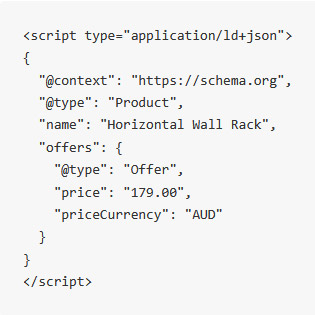
This code tells a search engine that the page describes a product called "Horizontal Wall Rack" priced at $179 AUD. Common structured-data types include:
- Product
- LocalBusiness
- Organization
- Article
- Event
- BreadcrumbList
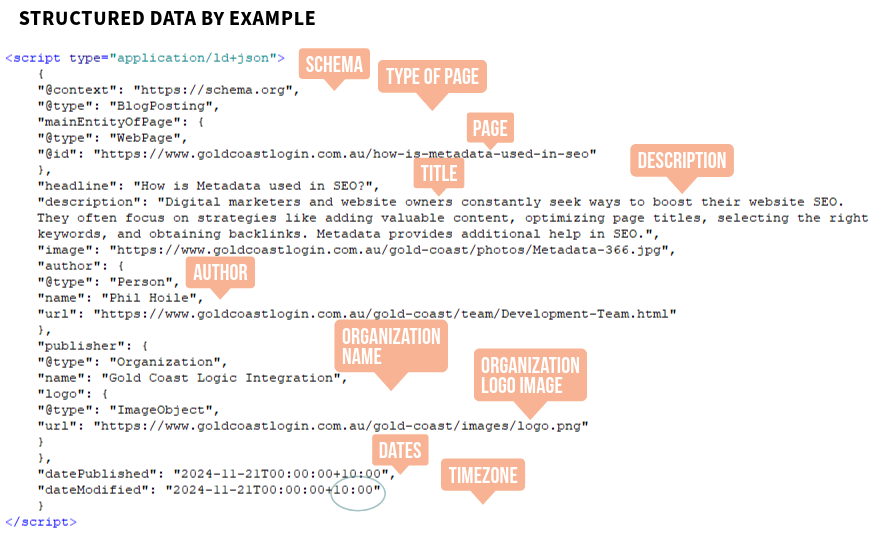
Structured data for a blog post
Why Is Structured Data Necessary?
Structured data gives search engines clear, standardised information about a page. According to Google Search Central, it provides explicit clues about a page's meaning and can make its content eligible for enhanced search appearances known as rich results. Depending on the content type, rich results may show:
- Product prices and availability
- Review ratings
- Business details
- Event dates
- Article information
- Breadcrumb navigation
Structured data doesn't automatically improve rankings, and valid markup doesn't guarantee Google will display a rich result. It makes the page eligible - Google still decides which search appearance is most appropriate. Its real value is removing ambiguity: a person can tell "$179" is a price from where it sits on the page, but a machine only knows that for certain when the markup explicitly labels it as a price and states the currency.
Why HTML Validation Isn't the Priority, Structured Data Testing Is
HTML validation checks whether a page's markup follows formal technical standards. While clean HTML is good practice, modern browsers are built to recover from most common HTML mistakes - a missing closing tag or an incorrectly nested element usually won't stop a page rendering or functioning. Those issues are still worth reviewing where they affect usability, accessibility or performance, but a completely error-free validation result is rarely the highest-value technical fix for an ordinary client website.
JSON-LD is far less forgiving. It follows strict JSON syntax, so a missing comma, a misplaced quotation mark, or the wrong value type can invalidate a property - or stop an entire block from being parsed - while the page continues to look completely normal. A classic example is a GTIN or product barcode that starts with zero:
"gtin13": 0726684672158Entered as a number, the leading zero is silently dropped.
"gtin13": "0726684672158"Entered as text, the identifier stays intact.
This is exactly why structured-data testing deserves special attention: the error is invisible to visitors but can change how the product is understood by search engines.
How to Test Structured Data: Step by Step
1 Select representative pages
Don't test only the homepage. Cover the main page types used across the site - homepage, product or service page, category page, blog article, and a contact or location page. Testing several pages built on the same template reveals whether an error belongs to the theme or plugin rather than one page.
2 Locate the structured data
Open the page, right-click and choose View Page Source, then search for application/ld+json. A page can hold more than one JSON-LD block, so check every occurrence - and test the live URL where markup is generated dynamically, since it may not appear as expected in the raw source.
3 Run Google's Rich Results Test
Enter the live page URL so the tool can examine the rendered page. Review every structured-data item detected, open each type, and note any critical errors or non-critical issues along with the exact property affected. Google recommends fixing critical errors first and addressing non-critical issues where the extra information genuinely applies.
4 Use the Schema Markup Validator
Test the same URL or code against Schema.org's broader vocabulary. A page can carry valid Schema.org markup that still doesn't match a Google-supported rich result, so running both tools gives the fuller picture.
| Testing Tool | What It Checks | Best Used For |
|---|---|---|
| Google Rich Results Test | Google-supported rich-result requirements | Checking whether markup may qualify for Google rich results |
| Schema Markup Validator | Broader Schema.org vocabulary and syntax | Finding syntax problems and reviewing markup beyond Google-specific features |
5 Compare the markup with the visible content
Passing an automated test doesn't prove the information is accurate. Check that product names and prices match, availability is current, business details are correct, URLs lead where they should, ratings are genuine and visible, breadcrumbs reflect the real hierarchy, and dates stay current. Google's guidelines are clear that markup should represent the page's visible content - technically valid but misleading structured data can still miss out on rich results.
6 Check Google Search Console
For ongoing, site-wide monitoring, review the relevant reports for products, merchant listings, breadcrumbs and other supported features. This is where a single error affecting many indexed pages usually surfaces first.
7 Determine the scale of the problem
One affected page points to that page's content or settings. Several similar pages point to a shared theme, template or plugin. Different page types point to broader site configuration or multiple markup sources - avoid editing pages one by one when the real fault sits in a shared template.
8 Record the results and retest
A simple report - page URL, structured-data type, result, affected property, scope, likely source, and next action - gives a developer enough to reproduce and fix the issue. Once a fix is applied, test the page again; never assume a content or code change has automatically corrected the structured data.
Tip: structured data should be checked when it's first implemented, after theme or template changes, after installing or updating plugins, following a redesign, whenever product or business information changes, when Search Console flags a new issue, and as part of regular technical audits.
Common Problems to Look For
- Missing required properties
- Missing recommended information
- Incorrect commas, brackets or quotation marks
- Numbers used where text is required
- Product identifiers losing leading zeros
- Invalid or incomplete URLs
- Prices or availability that don't match the page
- Outdated business information
- Duplicate markup generated by multiple plugins
- Placeholder values left in a template
- Markup describing content visitors can't see
- An unsuitable schema type for the page
Test What Search Engines Actually Read
A webpage's appearance can't confirm its structured data is working. Because JSON-LD errors are usually invisible, testing is the only reliable way to find them.
Google's Rich Results Test, the Schema Markup Validator and Search Console form a practical workflow for checking individual pages and monitoring the wider site. Testing representative pages, comparing markup against visible content, and documenting repeated errors lets you catch problems early - before they spread across every page built on the same template.
Sources and References
- Google Search Central, Introduction to Structured Data
- Google, Rich Results Test
- Schema.org, Schema Markup Validator
Search News Articles...
Recent Articles

Wix Shopping Limitations
- Oct 17 2026
- /
- 196

How audio enhances SEO
- Oct 07 2026
- /
- 158

Thunderbird bounce email cleanup
- Sep 22 2026
- /
- 292

Structured Data Testing
- Sep 14 2026
- /
- 277

This Meeting Could Have Been an Email
- Sep 10 2026
- /
- 300

Where Is Your Business Data Really Stored?
- Aug 14 2026
- /
- 359

From Search to Answer Engines: The Rise of GEO
- Jul 21 2026
- /
- 457

Does Instagram Boost SEO?
- Jun 02 2026
- /
- 713

The Growing Gap Between Coding and Engineering
- May 16 2026
- /
- 730

Have AI Agents Destroyed Social Media?
- May 05 2026
- /
- 754
View All News Articles
Categories
A Gold Coast SEO and Web Developer