Make your site irresistible to visitors and Google
- Local SEO
- Customer Focused
- Great Support
With so many gateways and payment solutions out there which is best for you?
We look at different solutions and mention the pros and cons of each.
This article is not designed to recommend any solution but to help in any decision.
In an article in the Australian Financial Review there is discussion about banks and payment-card groups benefiting by "clipping the ticket multiple times" as the payment goes from you to a merchant via a number of electronic gateways.
Hence the better we understand how this system works we increase the chances of reducing these costs.
Unfortunately the EFTPOS system that underpins our electronic payments from bricks and mortar businesses still cannot be used on the Internet.
We either build a custom cart for your site or integrate an offsite system that can process PayPal and Credit Cards where you manage yourself. What type of system you choose really depends on your budget and your familiarity with the Internet. As a leading Gold Coast SEO and web developer we can build a cart that will help you attract business and generate sales. If you "plugin" a shopping cart, can the website developer adjust it with changes in legislation and security? The many hands makes light work philosophy clashes with the lines of communication reality - the more people involved in some tasks requires an exponential growth in communication required. One full stack web developer who can build your system entirely can be an advantage.
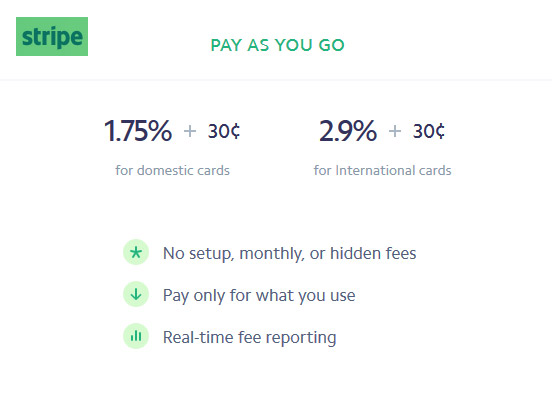
Stripe is currently my go to payment gateway mainly due to the features and ease of integration with my systems (Java) and no extra monthly costs (No setup fees, monthly fees, or hidden fees). You only need a bank account to get started.
PayPal was popular for its features and security, it is now less popular. eWay have some great new products that can have you up and running quickly without the need for a separate merchant account. They also have low transaction fees currently 1.5% + .25c based on achieving a certain volume.
You can give access (limited) to your web developer so he can test payments. Testing payments allows you to tweak the online experience without charges to your credit card. You are given a set of test numbers for certain payment scenarios. This speeds up testing whilst not costing anything. When you give access to your developer, they can login but must be authenticated by a second source (mobile phone) every time they login to Stripe. You can even fully test and isolate separate components whilst your main shopping cart is live.
It can be beneficial to speak to your bookkeeper before choosing your online solution as you may find they already have a Stripe compatible system for you eg Xero.
Rather than send visitors away from your site to complete a payment, with Stripe you can connect through a multi-process payment and give feedback directly to the customer in real-time from your site. The Stripe API allows you to step through the process and report back to the visitor on your site.
With the Stripe and Xero integration, your customers can pay your invoices using their preferred credit or debit card, helping you get paid faster.

Stripe was used by our clients www.futureshape.com.au who specialise in leadership development Sydney

Stripe requires an SSL certificate to ensure security. Check the eBook for sale - notice the https indicating a secure transaction.
Stripe has some nice features that remove the need for a complex shopping cart for most transactions. A skilled programmer can pass information into the payment processing section - avoid any duplicate entry of information but ensure a quick seamless process.
Some bank systems do not support legacy versions of the code used to make a payment. Stripe does, it allows you to go and add a new payment without upsetting previous working versions.
You essentially get a choice as a developer as to whether it is worth upgrading. In some cases it is not.
The latest Stripe APIs use JavaScript Object Notation (JSON) to efficiently query your site and the payment gateway to present information to the shopper without logins. The programmer can then use the information sent back from Stripe to craft the message to the user. It uses the JavaScript Fetch API which is better than previous AJAX calls. JSON is a way of communicating even from a static HTML page to a server back-end.
If your developer is working with the core code rather than accepting updates from a system developed elsewhere you are better able to manage any issue with a transaction.
As payment systems evolve, different products become available. Some like Alipay are popular for Chinese consumers. Stripe allows you to add Alipay and other options like Afterpay.
| Payment method | Customer country | Payment Intents | Checkout | Invoicing | Connect | Subscriptions |
|---|---|---|---|---|---|---|
| Alipay | China | Invite Only | Invite Only | |||
| Apple Pay | Global | |||||
| Click to Pay | Global | No | No | |||
| Google Pay | Global | |||||
| GrabPay | Malaysia, Singapore | No | No | |||
| Microsoft Pay | Global | No |
Stripe allows you to make products, and sell them almost immediately. Our preference is to take those products and create a page that also captures additional information and records details if payment is successful or not.
This setup allows your website to sell products on any page, very quickly, almost immediately, yet retain control over spam and give an almost shopping cart feel to the process. Payments are secure, in a seamless process.
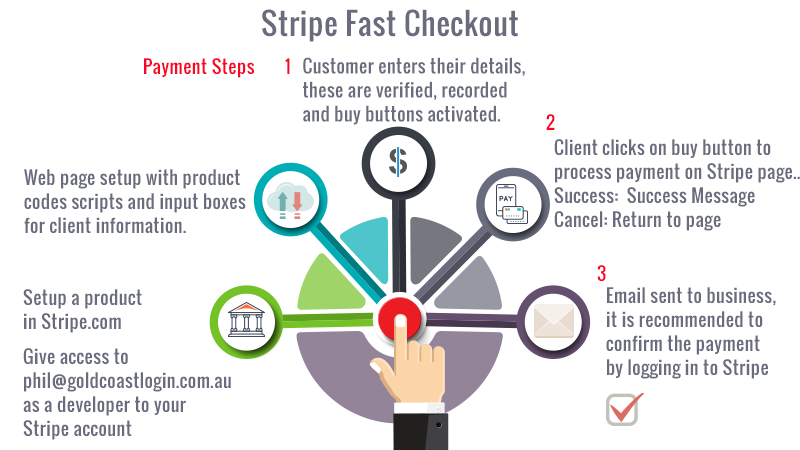
Creating subscriptions that need information from the payment gateway (Stripe.com) can be achieved by their webhooks system. You create what is called an endpoint that receives information periodically from Stripe. As a programmer, this allows you to create full subscription systems for a website that interact automatically. So you may create a low monthly payment system for your members. Access is monitored based on whether payments are maintained.
"Not every payment you received has to be from a Shopping Cart."
Stripe has adaptable techniques that resend information if for some reason the website is down. You can create once off promotions, combined with specialty landing pages designed to enhance SEO. Since Stripe maintains it's legacy code, you can be confident what you create will also work into the future.
Payment links allow you to create a link for a payment in about a minute.
You create a product within Stripe and then create a Payment Link for that product. There is no necessity to interact with your own website unless you wish to make a custom successful payment page.
Stripe integrates with many booking systems, Xero accounting platform and other software.
Booking systems are very complicated, because you need to calculate for dates, times, holidays and availability. If you are booking a Yoga studio which also provides remedial massage with multiple teachers or practitioners, you may need to also calculate a gap between certain appointments, send reminders, send emails and account for GST if applicable.
Booking software will usually add a charge on top of Stripe, either a set flat fee or a percent like 1%.
Integrating a booking system with a custom shopping cart with one major payment system makes sense.

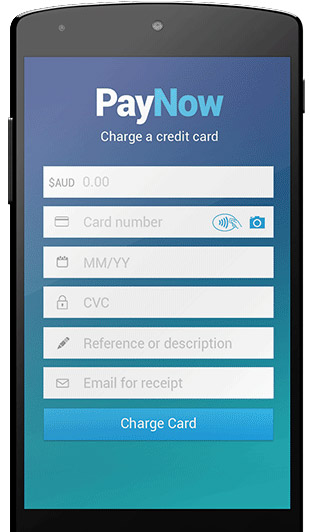
Sometimes it is important to process a payment on the spot with a credit card. With PayNow for Stripe you can do that for an extra 0.5 % on top of your Stripe fees. The App is minimalistic, with one feature that makes it a standout - you can process a test payment. It took 5 minutes to setup and do a trial test payment using a specific credit card number recognised by Stripe as a (successful) test payment example. Then just login to Stripe and check the payment in test mode.
1 Download the app (https://paynow-app.com)
2 Use the same passwords and email as your Stripe account (you may need to also set a pin)
3 Login in to your Stripe account to verify (use a seperate computer than your phone for the app)
4 Put it in test mode and try a test payment use credit card no 4242 4242 4242 4242 (make up valid other details)
5 You may need to verify on the app 1st time round but it all worked for me.
With security being an issue the solution that suits you depends on what you are selling.
A charge back on data downloaded is a completely different story to sending a Teak kitchen table halfway around the world only to have a charge back. A charge back occurs where a customer disputes a transaction and the merchant must refund the value of the goods / services. This is a problem as proving that an item has been ordered and received is up to the Vendor. So its not just fraudulent use of a credit card that is the issue, its the denying of ordering and receiving goods that can be a problem.
This is an issue of a standard contract which involves offer, acceptance and consideration. This works fine in a bricks and mortar store but certainly was not designed for the web.
You may also need to consider ensuring your web site terms and conditions protect you against implied warranty by adding a disclaimer.
Pay Pal has a variety of low cost Australian solutions.
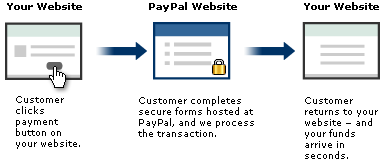
PayPal may be convenient for individuals (who cannot get a credit card merchant account) and businesses deterred by the level of credit card fees charged by some institutions.
It can be as simple as a Buy Now button. This is good for one product and cannot handle aggregate sales of multiple products.
PayPal Buy Now Buttons can be programmed and customised to in many examples eliminate the need for a shopping cart and the extra complexity a shopping cart requires.
One drawback with PayPal is buyers seem to need to login or as a minimum are faced with a fairly complex page when purchasing by credit card.
This will be the lowest cost scenario with the least chance of technical hiccup as it is simply a button with some code created by PayPal with the option of it being enhanced by a programmer. Changes you can make to the button include-:
When you have multiple products or need to aggregate sales from a basket you need a shopping cart. It seems everyone has a shopping cart to sell. They simply allow you to add items continue to shop, remove items or process a payment.
You can use a free shopping cart that Pay Pal provide or you can integrate your own or your web developers shopping cart.
Web buyers may be put off by going from your web site to PayPal's site - however you can customise the page that PayPal displays, but it is still going to another site. Any situation where a prospective buyer leaves your site is best avoided. If it is a recognised institution (e.g. a bank) or PayPal.
PayPal may not support the currency you wish to trade in. It supports Australian Dollars, Canadian Collars, Euro, Pounds Sterling, Japanese Yen and U.S. Dollar.
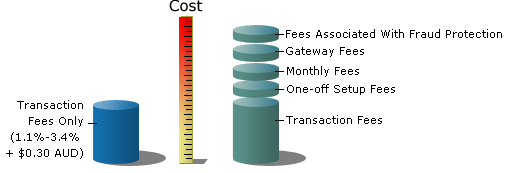
With PayPal, you pay as you go with rates as low as 1.1% - 2.6% + $0.30 AUD per transaction.
Fees for receiving payments from buyers in Australia
| Payment Type | Australian | International |
| Online payments | 2.6% + $0.30 | 3.6% + fixed fee |
| Website Payments Pro - Hosted Solution* | 1.75% + $0.30 | 3.6% + fixed fee |
| Invoices | 2.6% + $0.30 | 3.6% + fixed fee |
| PayPal Here card reader | 1.95% | 1.95% |
| PayPal Here - manual entry | 2.9% + $0.30 | 2.9% + fixed fee |
| Virtual Terminal* | 3.6% + $0.30 | 4.6% + fixed fee |
| Donations** | 1.1% + $0.30 | 2.1% + fixed fee |
How to set up a Shopping cart with PayPal»
Creating a PayPal Account»
You can refund the entire amount of a transaction or portions of it. When you issue a refund, the gross amount of the refund is sent to the buyer. The gross amount equals the net amount of the original transaction plus the refunded fee from PayPal.
Gross Amount = Net Amount + Refund Fee
If you issue a refund within 60 days, PayPal credits the original transaction fee for receiving the payment to your account. For partial refunds, PayPal credits a percentage of the original transaction fee based on the refunded amount. When you issue a refund after 60 days, your original transaction fee for receiving the payment is not credited to your account.
Paypal in Australia now allow you to call them directly to discuss their various products. ph 1800 729 725
PayPal Website Payments Pro may be a good option for cutting out the fees. Their prices look very attractive and seem to be lower if you use Paypal express checkout.
I have personally not used this system however being PayPal I am very keen to try this. You can use off the shelf shopping carts or a custom shopping cart.
More info on PayPal Website Payments Pro »
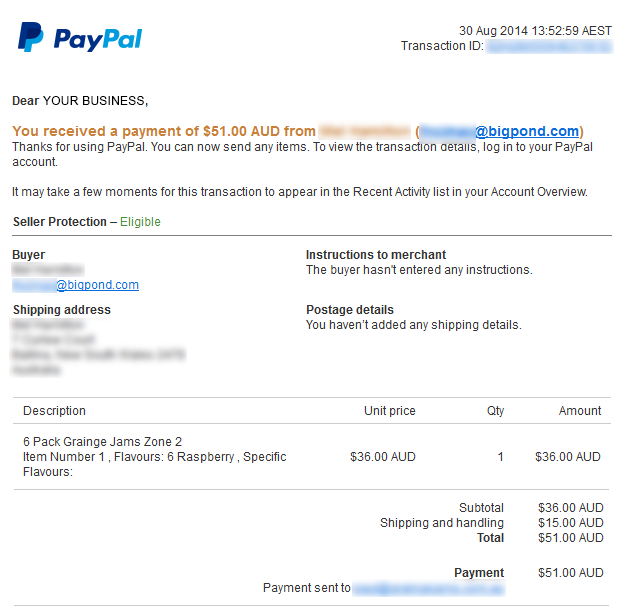
PayPal notifies you of a sale and lists all the information in an easy to read format that would allow you to process that sale from that email. Below is an example a notification of payment received -:
eWay recently bought their services much inline with PayPal with a couple of great features -:
Same Day Settlement - get your cash fast
Plus other awesome features, including:
These are great features backed with knowledgeable help - they are never easy to set-up unless using the PayNow buttons which is cut and paste for transactions accepted on your site.
You could take manual transactions from your phone - even a mobile phone without monthly fees.

Paymate offer Australian* Online / MOTO transactions at 2.60% per transaction - they handle 60 world wide currencies and have other mobile products for processing payments on the go.
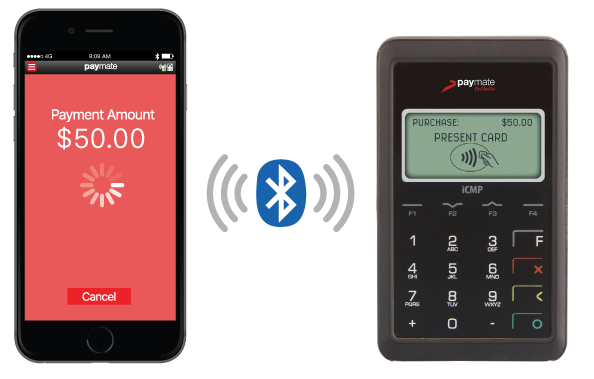
"Our card reader is Level 1 EMV compliant. This means that in the event a cardholder disputes a transaction and raises a chargeback against you, often the liability shifts onto the card issuer instead of you."
The have an API for a number of shopping carts and do offer access to developers. They also have a product (Paymate OnTheGo mobile app) that turns "your existing smart device into a feature rich mobile POS"
Check the PayMate site for up to date details on PayMate
Authorize.net now have some features available to Australians. Some features like Custom Fraud Settings would allow businesses to block fraudulent behaviour which you may see as a pattern.
E-commerce is such a complex area. Your customers will need to feel comfortable transacting over the web. The features of a solution like Authorise.net could be a confidence booster for your clients.
A custom quality website is a must. Being found in search engines under your keywords is also very important.
Combine a quality product, search engine strategy and a quality design that helps to engage your viewers will lead to sales. The feeling you get when all these come together is well worth the effort.
If you are going to be serious about transactions over the net you are going to need a merchant account with a bank e.g. St George or NAB and many other Australian banks. This allows the buyer to stay on your website to complete the transaction and to receive confirmation of payment.
You apply for a merchant account and then need to organise a Gateway or organise the Gateway and then the merchant account.
Approval by banks for Online Merchant facilities are understandably strict. Be prepared for a detailed application form. Companies that handle gateways include:-
Gateway providers charge on a per transaction basis. This is generally forced upon them and should be considered a given cost.
Some charge fees for duplicate transactions and reversals but again they are charged for these themselves.
The bank needs to determine what type of risk you are.
If you are what they term a new business you may need to furnish a business plan and cash flow projection.
Fees
At the time of writing St George charge the following fees-:
Hence it is important to do your homework. Depending on your business if you have few transactions at higher amounts or many transactions you will need to know industry averages and all information that will help you bargain.
New businesses are obviously regarded as risky so previous success in business may help.
For example you may wish to use eWAY as your payment gateway.
Using this gateway allows you to process payments securely on your website without leaving it. The programmer (web developer) will add some code and ensure SSL (Secure Socket Layer) is used to encrypt the transaction and will use example code provided by either company.
Your websites programming language may be PHP, .NET or Java. This code needs to communicate with the Payment Gateway which in turn processes the transaction. Your web developer uses this code to attach your shopping cart or link information to the payment gateway for processing. Most payment gateways offer a variety of languages and options for your web developer to use. Our latest approach is in this article on Online Strategies.
With the presence of new products like Afterpay it may be tempting to offer 'everything' to your customers. Every opportunity to purchase has to be good?
If you are integrating an API like Stripe there will be a number of transaction workflows for a successful sale. However with 1 site and 1 payment gateway it is far easier to handle issues. With multiple APIs you have to deal with upgrades. Stripe for example has rigorous support for multiple programming languages and version of their system. Other systems not so. Hence the temptation to add multiple opportunities to capture a sale must be weighed up against the maintenance costs in keeping the system working.
Online fraud is booming in Australia. One estimate is $71 million for the year ending December 31, 2008 with nearly half the total fraud on local cards.
This is an excerpt from NAB Credit Card Security
Tips to help protect your financial identity:
1 Apply for an Internet Merchant account - Netregistry uses St George and NAB, eWay uses St George, Bank SA, ANZ and CBA. Now you have to negotiate yourself a good deal with the bank - this is by far the most difficult part of the whole excercise. Try to compare banks and be prepared for some differences. Some banks are far more welcoming for some industries than others.
Westpac have a good system with Payway.
2 Select your Payment Gateway - Choose who you want to use e.g Netregistry or eWay. For example Netregistry has a set fee per month and no transaction fee however eWay may be cheaper if you have low transaction volumes but has a $ .50 transaction fee per transaction. Find out the banks that your preferred Payment Gateway use.
3 Set up the website - this is where you use your web developer (hopefully me) to set up the site to securely carry out transactions. Of course all of this is quite useless if no one can find your site. Make sure your web developer understands how to actively improve your site in search engines like Google. It is easy to test this, look at their existing portfolio of sites - enter competitive keyword terms into Google and see if the site comes up on the first page.
Site design is also important as good design will lead your customers into a process that keeps them away from distractions and helps to gain a sale. A professional look is also important - your customers need to feel confident the transaction is safe.
Sometimes I can secure a discount for my customers with certain Gateways especially in the first year when you a paying for the new website. Any cost saving is appreciated by my clients especially if it is a new site.
You can cut the leg work down to 2 organisations :-
1 The bank e.g. Commbank
2 Your web developer e.g. me
Commweb has been chosen here but other banks may have similar products. Commbank have replied to my enquiries and have patiently explained their products.
Firstly there are some hefty fines and possible loss of use for people using normal merchant facilities to process credit cards via the Internet. The credit card companies themselves may fine up to $ 50,000 in some cases.
So is someone suggests using non secure Internet solutions or even email you may be putting your business at serious risk.
Using Commweb the advantage is you can setup your
payment solution and then look for a web developer to set your web site for you. The fees you will pay to Commbank are :-
From here on as long as you are happy with your payments you can find a web developer who will set up the system for your web site. The web developer will deal directly with IT setup people of Commbank and install the code in whatever format suits and you are ready to sell.
The bank may want or may approve your application if you have a security deposit.
This can be a good situation once you are processing over 150 transactions per month ( based on averages ).
You can get an indication of the fees from 1800 730 554 (Direct Sales for Merchants). These will vary depending on the risk profile of your business.
If your business does not have a huge profile using recognised institutions like Commbank, Visa and Mastercard can be an advantage rather than the total transaction on your website.
The hosting company the web developer uses will need to have the Commbank components available or be able to set them up.
Commbank also have a VirtualPOS BatAuth product.
VirtualPOS BatAuth is a low cost batch solution that lodges credit card transactions electronically for authorisation and value creation. This solution may be useful to business's that do less than 150 transactions per month.
Philip Hoile lecturer at Griffith University 2000 - 2013 in e-business, advanced e-business, e-commerce and User Interface Design. A full stack web developer. Creating systems that also work well for SEO since 1996.
 07 55320651
 0423 926 852
Disclaimer Information is presented here that may go out of date or expresses an opinion. This does contain information from sources I have an association with (i.e. I use thier services)
Payment Gateways in Australia»
Online Shopping Cart»
Instant Payment Gateway»
iPhone Payment Gateway»
Website Security»
Payment Gateway Comparison Tool»
Payment Gateway Case Studies»
Setting Up a PayPal Account»
How to setup a Shopping Cart with Paypal»
 Currently Stripe is my go to payment gateway
A Gold Coast SEO and Web Developer