Creating a PayPal Account
Create the correct PayPal account for your business. The choices are-:
- Personal (Shoppers only)
- Premier (Shopping carts or buy now buttons for businesses not listed below in Business)
- Business
- Sole Trader
- Public Company
- Proprietary Company
- Government Body
- Association
- Partnership
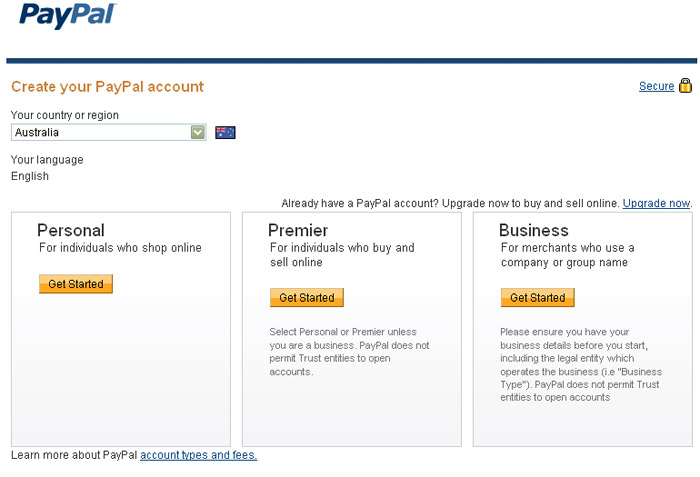
An example of the choices from the PayPal website
Entering the correct information
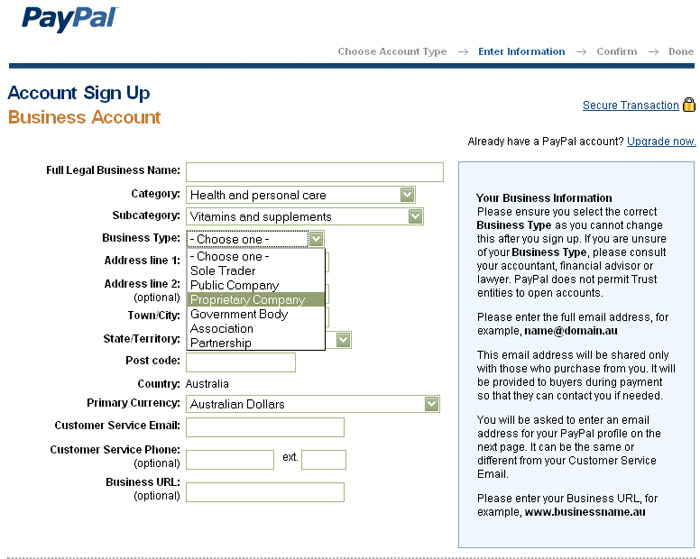
PayPal need to be strict in who signs up especially for buinesses. Hence it is important to get the details right as some sections cannot be changed once setup.
Business Account
It is important when setting up a business to consider the legal business name and ensure it is either associated with your website domain name or clearly mentioned on your site. This is important because if the shopper leaves your site they are expecting to see a name on the PayPal account that they can associate with your business.
It is a good practise to work from the payment backwards to ensure people are going to pay you and not stop at the crucial moment because they cannot recognise the Business Name. From a website design point of view we work the other way as well to ensure someone wants to buy in the first place.
Check the information below on Business Type and an email address used.
PayPal uses your registered email address as your account identifier - hence ensure your email address is one you can keep permanently and reflects your business.
With my clients I step them through this process including-:
- setup email addresses
- ensure site is fast well designed and optimised
- SEO - getting to the top of Google
- Upgrade to a payment gateway using a merchant account
- monitor competition and look for opportunities to improve sales
About the author
Philip Hoile has lectured at Griffith University in e-business, advanced e-business, e-commerce and User Interface Design. A web developer since 1996 specialising in programming website Content Management Systems.
My interest in web marketing stems from a desire to improve client outcomes.
 07 55320651
 0423 926 852

Disclaimer Information is presented here that may go out of date or expresses an opinion. This does contain information from sources I have an association with (i.e. I use thier services)